
Global function mapping
Global function mapping allows consumers to use functions exposed by a provider through a module interface.
When a function is made public, it becomes part of the interface contract. Consumers can then map and call that function as part of their own workflows, while the provider remains responsible for the function definition.
This means that business logic can be defined once and reused across multiple databases.
How it works
A provider defines a global function and exposes it through the interface. When a consumer connects to that interface, the function becomes available as part of the imported structure.
Internally, Ninox handles the necessary translation between interface-level identifiers and local database identifiers. This allows functions to remain stable externally even if the internal schema differs.
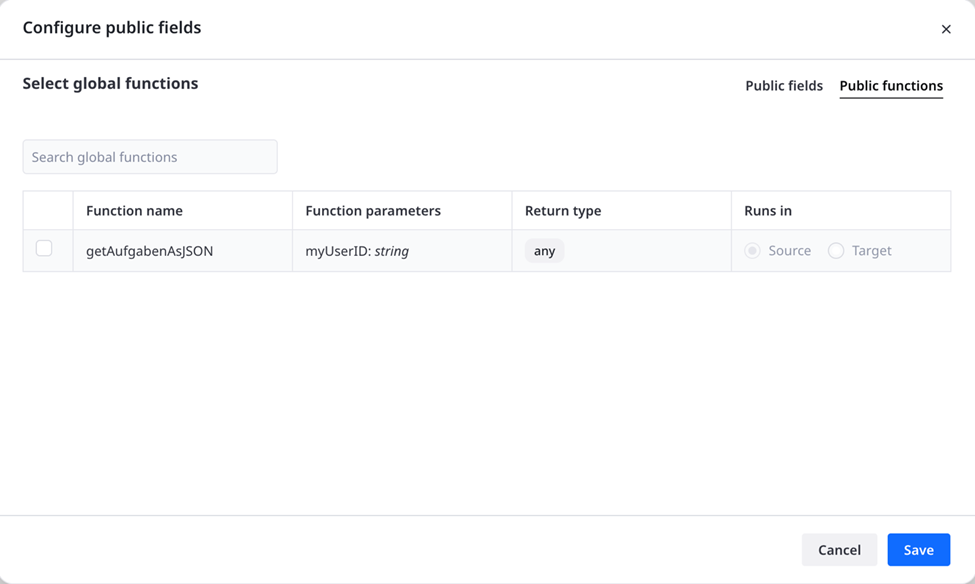
A module interface can expose global functions in addition to fields. When configuring public functions, you select which functions are shared and review their parameters, return type, and execution context.
Runs in
The Runs in setting defines where the public function is executed when it is called through the module connection.
- Source: the function runs in the source database (the provider).
- Target: the function runs in the target database (the consumer).
This matters because the execution context determines which data, logic, and permissions the function can use.
Runs in: Source
When a function runs in Source, it is executed inside the provider database.
Use this when the logic should stay on the provider side, for example when the function:
- needs access to provider-specific tables, scripts, or internal logic
- should use fields that are not publicly exposed
- should return only a controlled result instead of exposing raw underlying data
This is especially useful for encapsulation and data protection. A source-side function can work with sensitive or internal data in the provider database, while only returning the output that the consumer is allowed to receive.
Example:
A database with constants for calculation contains global functions that refer to data in its table "Constants". These functions are then published in an interface to allow their usage in other consumer databases.
The "Constants" table is set up like so:
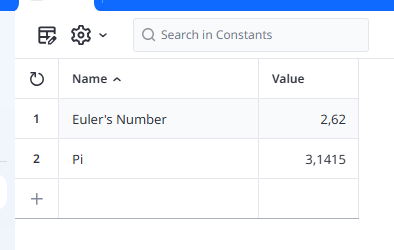
The global functions are defined as follows in the provider database:
function calcCircumference(radius : number) do
    first(select Constants where Name = "Pi").Value * radius * 2
end;
function returnEuler() do
    first(select Constants where Name = "Euler's Number").Value
end
An interface "myMathFunctions" containing these functions running in the source is constructed in the provider database and then connected in the consumer database(s). To then call on the function in a consumer database script, apply the interface() function like so:
let myCircle := interface(myMathFunctions).calcCircumference(Radius);
let myEuler := interface(myMathFunctions).returnEuler();
myCircle * myEuler;
[...]
⚠️ Global functions published in an interface cannot run in the source if they would just return data of the type "nid", like the result of a "select TABLENAME" script. The return type must instead be any other kind of information derived from the "nid" data, e. g. (select TABLENAME).(number(Id)) to instead return the array of record IDs.
⚠️ If a global function is supposed to return data from the source database in the form of a JSON ("any" data type) the creation of the JSON must occur in the server context, ergo like so:
function getExpensesJSON() do
     do as server
        (select Expenses).{
            user: User,
            amount: Amount,
            requestDate: 'Request date'
        };
    end;
end;
⚠️ Starting with version 3.18.27, global functions executed in the source possess heightened privileges and assume the access rights of the "admin" role by default even if the user executing the script (via button, trigger, formula field, etc.) does not possess that role. This is done to remove limitations in the ways modularized global functions can be applied.
Any scripts calling such functions need to be thoroughly checked by the database architect beforehand to avoid the unintended exposure or manipulation of sensitive data.
Runs in: Target
When a function runs in Target, it is executed inside the consumer database.
Use this when the logic should operate in the target context, for example when the function:
- needs access to target-side data
- should work with mapped or imported records in the consumer database
- is meant to continue processing after provider data has already been synced or made available
In this case, the function does not execute with direct access to the provider’s internal, unexposed data. It only works with what is available in the target database.
Why this is important
Choosing Source or Target is not just a technical detail — it affects:
- data visibility
- security and privacy
- which database logic is used
- how much of the provider’s internal structure is exposed
In general:
- choose Source when you want to keep logic and sensitive data on the provider side
- choose Target when the function should run as part of the consumer’s own workflow
Benefits of global function mapping
Global function mapping creates a single source of truth for logic.
Instead of maintaining the same formula or workflow rule in multiple places, teams can centralize logic in the provider and reuse it everywhere the interface is consumed.
This improves consistency and reduces maintenance effort, especially in larger modular systems.
Designing shared functions carefully
Because exposed functions are shared across databases, they should be treated as stable contracts.
Changes to function parameters or return behavior may affect all connected consumers. Shared functions should therefore be introduced and updated with the same care as exposed fields.