
Modularity concepts
For users testing modularity v2 in Ninox 3.17 beta on Private Cloud
ℹ️ Note: This article describes the conceptual model of modularity. For current implementation limits (such as unsupported field types, global function availability, or beta-specific behavior), refer to the FAQ and quick start guide.
1. Understanding the concept
Modularity is the practice of building software as a collection of independent, interoperable units (modules). In Ninox, a module is a self-contained database that shares only selected data and logic through a module interface. Other databases access that module only through the interface, which exposes specific tables, pages, fields, and formulas. Because all external access goes through this contract, you can reuse, replace, or update the module without exposing its internal setup.
Benefits of modularity
- Isolation: schema changes and bugs stay inside the module that caused them.
- Reusability: one module can serve many solutions without copy-pasting logic.
- Updatability: you can release new interface versions without breaking target databases, as long as you keep exposed IDs stable.
2. Best practices
At first, deliberately hiding tables, pages, and fields may feel limiting. Over time, lean interfaces make your solution safer to maintain and easier to evolve.
Best practices for easier maintainability and development
- Loose coupling: expose only what another module truly needs. Fewer exposed elements mean fewer places where changes have an impact.
- Separation of concerns: give each module a single, well-defined responsibility.
- Domain modeling: design tables around real-world entities inside that domain.
3. Key properties and practical impact
At a glance, modularity in Ninox is about clear contracts and controlled sharing: a module keeps its internal data and logic private and shows other apps only what its interface exposes. This approach retains encapsulation while allowing teams to compose larger solutions. The interface is the public contract—tables, pages, fields, and formulas you've chosen to expose—so target databases never depend on private tables, layout fields, or scripts.
These six key properties highlight how the design of modularity impacts everyday use:
- Interoperability comes from stable identifiers. Every exposed element—tables, pages, fields, formulas—is defined on the interface with a system ID and a public name. Providers keep their own internal names for clarity, while module consumers see only the public name. Because the public name maps to a hidden ID, you can rename labels without breaking connections. The interface ID itself is the API-level identifier for the contract, so changing it creates a new interface that module consumers must update to.
- Replaceability means you can swap modules with minimal disruption. If two modules share the same interface identifier and exposed element IDs, a module consumer can switch to a newer or alternative source module without breaking existing connections. This is exactly what loose coupling optimizes for—easier updates, reuse, and replacement over time.
- Updatability is handled by versioning and a safe upgrade path. Saving changes on the interface automatically creates a new version. Module consumers can continue working on the previous version and decide when to apply the update. While an update is pending, syncing is paused. Once module consumers apply the new version, syncing resumes.
- Security and access control are enforced at the interface. Read access is now defined as Read-only, meaning module consumers can view data but can't change it. Write access is defined as Read and write, meaning module consumers may edit exposed fields if the provider allows it. The provider always retains write access, and we recommend granting read and write access sparingly.
- Composability means you can add multiple modules to the same workspace—each with its own isolated database and interface—and layer them using patterns like core/extension or shared references.
- Distribution packages the module and its interface so it can be shared or imported across workspaces.
✅ Tip:
When using modularity:
- Expose only the fields target databases truly need (data and calculated fields).
- Rely on public names and IDs for stability.
- Plan changes as interface versions.
- Prefer Read-only access unless a workflow truly requires Read and write.
- Design modules so they can be composed or replaced without touching internal tables and scripts.
4. Layering modules: A mental model
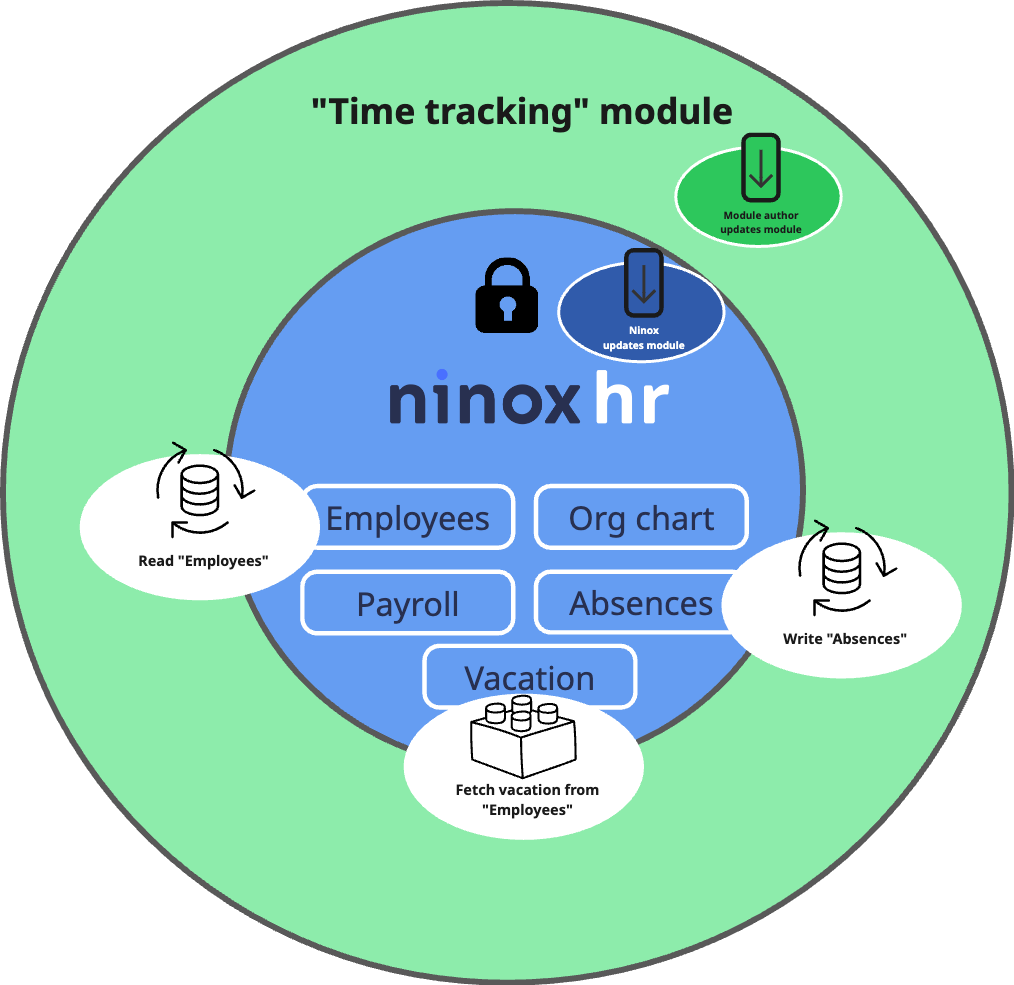
Think of modules like layers of an onion. A core business module (for example, "HR") sits at the center, while complementary modules (for example, "Time tracking") surround it. The time tracking module might read employee and vacation data from HR and write back absences, without ever touching internal HR tables directly. If time tracking only needs a few fields (such as hours worked), keep it as a separate module; if payroll or absence planning requires deeper, shared data, keep those tables inside "HR." The point is to let data flow where it must—no further.
5. Modular vs. non‑modular databases
Instead of blending everything into one big app, a modular solution draws clear boundaries and connects them through an interface.
- In a regular (non-modular) database, tables and logic are tightly coupled through direct references and ad-hoc scripts. Renaming a field or restructuring tables generally affects only that one database, but it can still break internal formulas or workflows because everything is directly linked. This tight coupling makes testing, updating, and replacing parts of the solution more difficult over time.
- In a modular database, the source exposes selected tables, pages, fields, and formulas through an interface. Target databases receive external tables that mirror those exposed parts, apply field mapping, and stay in sync while connected. Because the interface is the contract, providers can safely change internal names and structure while target databases rely on stable IDs and public names. A target database can also serve as a new source database for downstream modules, allowing modular solutions to be composed into larger chains.
6. How interfaces shape change—versioning
Interfaces make change explicit. When you adjust which elements the interface exposes and then save, Ninox creates a new interface version. Module consumers continue to work on the previous version until they decide to apply the update. While a new version is available but not yet applied, syncing pauses. After updating, syncing resumes with the latest version.
✅ Tip: Treat interface changes as product releases: communicate intent, test with a target database, and plan for module consumers to apply the new interface version (while knowing that syncing pauses until they do).
What to keep in mind
- Changing internal (non-exposed) fields doesn't affect the interface or existing connections in the target database.
- Public names of tables, pages, fields, and formulas can be refined without breaking target databases because the underlying system IDs remain stable.
- The interface ID is part of the contract. Changing it creates a new interface: existing target connections stay tied to the old interface ID and stop syncing, and module consumers must connect to the new interface ID (and remap if required) to resume syncing.
7. Data sharing and synchronization—what to expect
When a target database connects via a module interface, Ninox creates external tables in the target database—one per exposed table—and immediately populates them with the provider's current records. Ninox also applies field mapping to align exposed fields to the target database's schema. A target database may itself become a source database for downstream modules.
While connected:
- Read-only access: updates flow from the source to the target. Edits in the target database don't change the provider.
- Read and write access: updates flow both ways. Target edits on exposed fields are written back to the source.
When an interface update is available but not yet applied, syncing pauses. Module consumers continue working with the last synced data until they choose to update, after which syncing resumes.
If the interface is removed or a database is moved or deleted, the former external tables remain in the target database as regular tables. They stop syncing, but the data remains available.
8. Naming—IDs, internal and public names
Clear naming conventions benefit both module providers and consumers.
- Internal names for tables, pages, fields, and formulas keep the schema readable for providers and can be changed at any time.
- Public names for tables, pages, fields, and formulas are what module consumers see in the UI and formulas. You can refine these without breaking anything because the underlying system IDs remain the same.
- Interface IDs identify the interface itself for both module providers and consumers. Treat the ID as a versioned API label and use a human-readable name. Changing the interface ID creates a new interface; existing connections stay tied to the old ID.
9. Design guidelines
Good interfaces are intentionally lean and audience-aware.
- Expose only what's needed. Keep dependencies shallow by sharing the minimum data required between modules.
- Align modules with business capabilities. For example, create a "Recruiting" module rather than an overly specific one like "Applicant address."
- Customize public fields to the audience. Partners may need broader sets; internal teams often need only what their workflow requires.
10. Common design patterns
Use these patterns to keep modules simple yet effective:
- Core and extension: Provide a mandatory base with optional add-ons. Example: "HR core" with a "Time and attendance pack."
- Shared reference: Centralize lookup data that multiple modules rely on. Example: a country-codes module consumed by "Billing," "Logistics," and "CRM."
- Facade: Hide complexity behind a slim, ead-only view that aggregates key metrics from several tables. Example: a project dashboard that returns KPIs via a read-only interface.
11. Where to go next
- For step‑by‑step flows for module providers and consumers, visit the FAQ and quick start.
- For precise definitions of roles, fields, names, and permissions, refer to the glossary.