
"Refresh" option in view and graph elements
Controlling when the content of a view or graph will be recalculated
The view and graph elements both utilize a script to return a certain subset of records which are then displayed in the respective form. These scripts can vary in complexity and computational effort for both the server and client. The phenomenon of the "delayed select" (see this article for a deep dive) can even cause significant performance degradation for all users of any database because whenever any change is made to any record in the displayed table, it automatically recalculates for every actively working user which puts strain on the server if a "select" is involved.
The "Refresh" option
Within the settings of any such element, the option Refresh allows for precise control over the recalculation of its script.
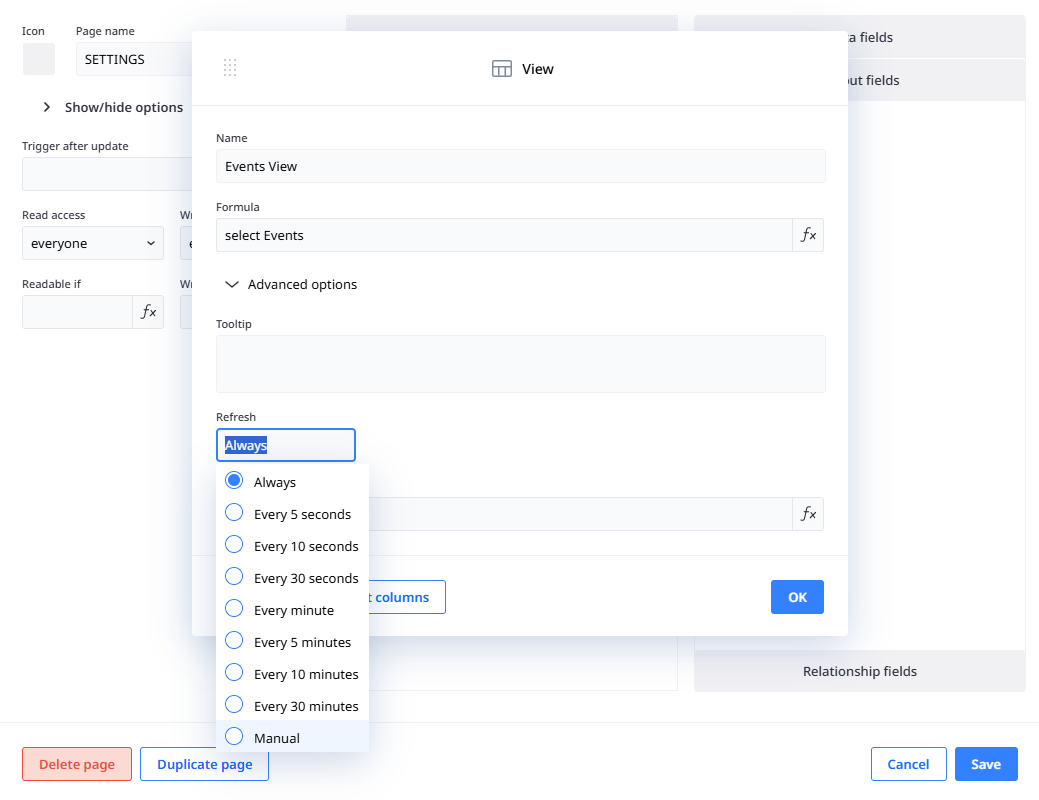
Always
The default setting which causes the recalculation to be done every 30 seconds or whenever any change is made to any record in the selected table (does not have to be a record displayed in the view or graph).
Time intervals
Several intervals from 5 seconds to 30 minutes can be selected. This will cause the recalculation to be done for the user currently observing the view or graph in the chosen interval and entirely disregard changes to records of the selected table as a recalculation trigger which can significantly improve performance in dashboards that are heavily frequented by users.
Manual
If this option is chosen the view or graph will only run the calculation once automatically when it is first viewed in any user session. To refresh it at any chosen point in time, the refresh icon in the top right corner of the element must be clicked.
While this does come with the side effect of having to manually interact with the element, it is by far the best option to improve performance.