
Field Indexing in Ninox
Indexing fields used in queries
After analysing the performance of many Ninox solutions, there are many queries that repeatedly scan entire tables even though they return a small number of results.
Typical pattern:
- Large table (e.g. 20,000+ records)
- Query runs hundreds or thousands of times
- Each execution scans every row
This most commonly happens when no index exists on the filtered field, it can also happen when queries are written in a way that prevents indexing. It negatively impacts the performance of scripts that rely on such scans, and it can also degrade performance across the entire solution and cloud environment.
The impact on performance increases if many of these queries exist in a database and is further amplified when multiple users execute them simultaneously.
How to apply indexing to a field
To index a field:
- Open the table you are querying
- Go to the field settings
- Enable the “Index” option
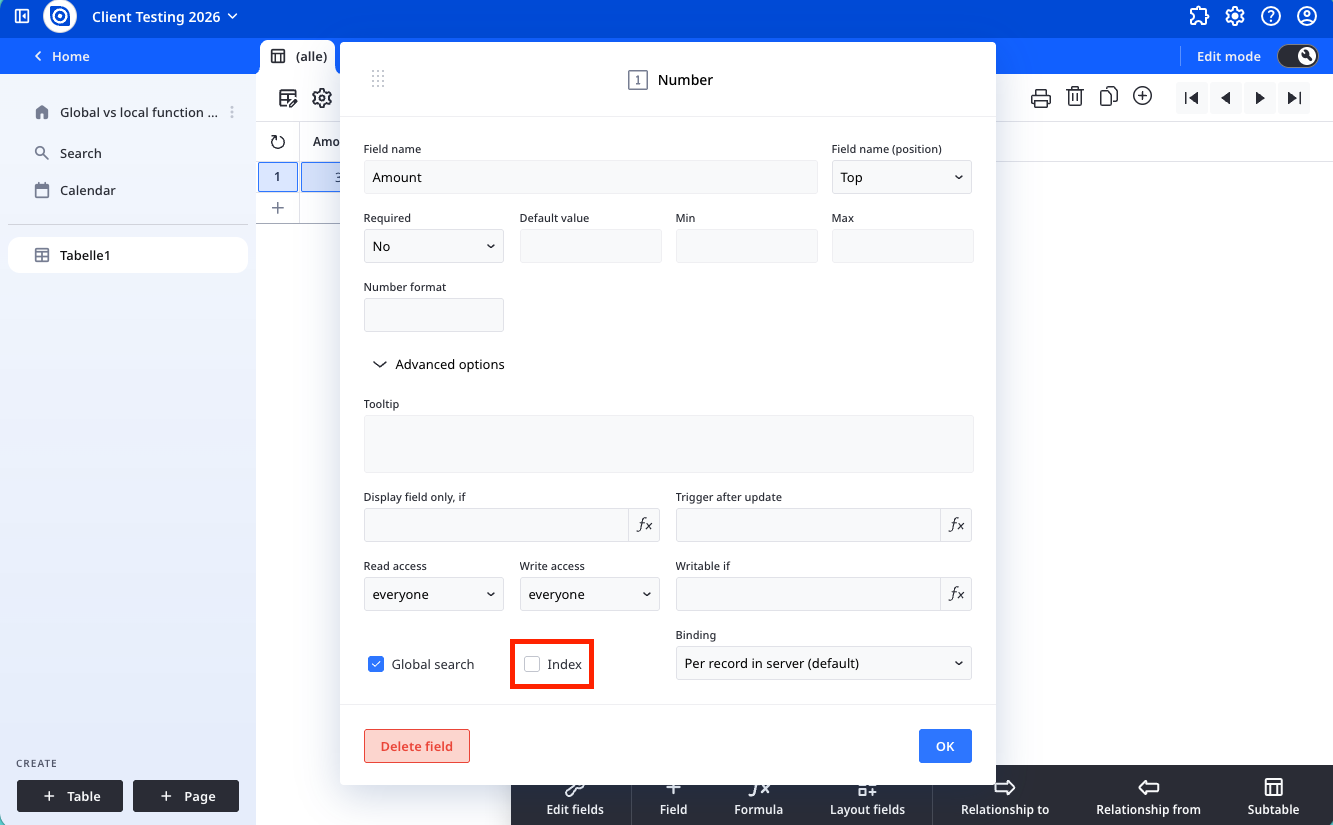
This creates a lookup structure that allows the database to find records efficiently.
⚠️ IMPORTANT
The indexing process does not happen immediately. Depending on the amount of records in the table and the total size of all data in the column the process can take up to several minutes. Should the workspace or server be restarted during that time the indexing process will be halted and not concluded after the restart. Only the Rebuild indexes feature in the database options can then remedy this.
If several fields are to be indexed we recommend chosing a time when few or no people work in the database and to wait at least 15 minutes between each individual indexing.
When to apply indexing
Apply indexing when the following are true:
- The table contains a significant number of records (thousands or more)
- The field is used in WHERE conditions (filters) in select statements
- The query is executed frequently (e.g. in views, dashboards, scripts, automations)
For example, the table 'Tasks' is large and frequently queried for dashboards. Suppose each task carries a unique match code stored in a text field 'Reference', and a search field 'SearchReference' holds the value being looked up:
let mySearch := SearchReference;
select Tasks where Reference = mySearch
Applying indexing to the 'Reference' field would improve the performance of this query. A match code text field is a good candidate because its values are distinct across the table. A choice field, by contrast, usually repeats the same value across many records, which reduces the benefit of an index.
To further maintain performance of dashboards in large solutions with multiple users working simultaneously, it is also a good idea to follow best practices by using a client-sided select. You can read more about this in our performance documentation.
When to avoid indexing
Indexes should not be added by default, as they need to be used sparingly and only when there is good reason to do so. They consume additional storage and memory for their execution. They can also increase the time taken for the completion of any write actions to the table, as any new record(s) would need to be indexed.
Here is when you do not need to apply indexing to a field:
- The table is small
- the field is rarely filtered
- the query does not run frequently
- almost all records share the same value
- there is a limited value set (e.g. Yes/No fields)
How indexing improves performance
Let’s take an example where the “Status” field is unindexed and add another based on the assigned user of a task:
select Tasks where Status = 1or
select Tasks where AssignedUser = user()As the field is not indexed, this is how the table will be queried:
- Load record 1 → check condition
- Load record 2 → check condition
- Repeat for every record in the table
If the table has 20,000 rows: → 20,000 evaluations per query
If this runs 5,000 times: → 100 million evaluations
If you index the field, this is how the query is executed:
Execution becomes:
- Look up “Open” in the index
- Retrieve matching record IDs
- Load only those records
This jumps directly to the results, reducing execution time. You are reducing the number of scans from a potentially huge number to a much more manageable number.
Requirements for the index to be used
An index only takes effect when the query is written in a specific way. Creating the index is not enough on its own. Three conditions must all be met for the index to be used:
- The indexed field is used directly. It must not be wrapped in a function, and it must not be referenced through a formula field that only displays its value.
- The operator is one of:
No other operator uses the index. In particular, contains() and like do not use the index, because like is a case-insensitive substring comparison and the optimiser only accepts the operators listed above.=, >, >=, <, <=
- The other side of the comparison is a literal or a let variable. It must not be a field reference, and it must not be a calculated value; a calculated value must be assigned to a variable first. Examples can be found below.
Point 3 is the practical catch and is worth checking in existing scripts. The index scan needs its search value once, before the scan starts, in order to jump to the correct position in the index. A variable is evaluated once beforehand; a field reference could be a field of the record currently being read, so the engine does not use the index.
Uses the index: the search value is assigned to a variable first
let searchValue := 'Search Reference';
select Tasks where Reference = searchValue
Does NOT use the index: compared directly against a field, full read
let zz := this;
select Tasks where Reference = zz.'Search Reference'
A structural rule follows from this: the indexed condition must be the first parameter of the select and stand on its own. Further conditions should then be applied to the result of that select (see the examples below).
More examples
A function on the field prevents the index
If you apply a function to an indexed field, the index cannot be used:
select Tasks where upper(Status) = "OPEN";
select Tasks where someFunction(Status)
A full scan is necessary here, because the field is no longer used directly.
The “or” condition prevents the index — use separate if branches
An “or” condition gives no index, so separate if branches are better than one combined expression.
“or”: no index, the whole table is read:
let searchValue := 'Search Term';
select Tasks where Reference = searchValue or Title = searchValue
Better: one branch per criterion, each uses its index
let searchValue := 'Search Term';
if 'Search Reference' then
select Tasks where Reference = searchValue
else if 'Search Title' then
select Tasks where Title = searchValue
else
null
end;
Combined multi-condition selects are compiled as a script filter
The following pattern is correct and functional, but it always scans the whole table and never uses an index, even when Field1 is indexed, because the combined condition is compiled as a script filter:
let c1 := Condition1;
let c2 := Condition2;
let c3 := Condition3;
select Tasks where (not c1 or c1 = Field1) and (not c2 or c2 = Field2) and (not c3 or c3 = Field3)
When one criterion is an indexed key field, put that one alone in the select and apply the remaining conditions to the result:
if c1 then
(select Tasks where Field1 = c1)[(not c2 or Field2 = c2) and (not c3 or Field3 = c3)]
else
select Tasks where (not c2 or c2 = Field2) and (not c3 or c3 = Field3)
end;
Minor note: ‘not c1’ also treats the value 0 as "no condition". This is irrelevant for text fields, but worth checking for numeric or choice criteria.
Prefix / range search
Two conditions on the same indexed field using >= and <= become a single range scan, so a prefix search is possible. The upper bound has to be calculated into its own variable first:
let p := 'Search Reference';
let pEnd := p + "zzzz";
select Tasks where Reference >= p and Reference <= pEnd
Searching inside a field cannot use an index
The index orders entries by the whole field value, starting from the first character. This lets it jump straight to a value or a prefix, but it cannot locate text that appears in the middle of a value. A substring search is exactly that, so contains() and like can never use the index and always fall back to a full scan.
Practical option
- Store the value in a clean, normalised form (for example digits only, one value per field, indexed) and search with =.
A select in a formula field is recalculated on every read
A select placed in a formula field is recalculated on every read and every time any record in the queried table changes. do as server only decides where the query runs, not how often. This means all records are reloaded and filtered in memory afterwards, which no index can speed up. Put the condition into the select directly rather than filtering a formula field's result in memory. cached() is not a substitute for a live view: it keeps the first result until edit mode is entered or invalidate() is called, so a live search would stop showing new or changed records.