
Problem accessing a subtable from a reference record
I have a Dynamic Choice field called “Employees”.
In the same table, I also have two numeric fields: “USD” and “ZMW”.
I want to create a button that, when clicked, will find the selected employee in the Employees table and create a new record in that employee’s subtable “Employees_History”, copying the values from the fields “USD” and “ZMW” into the corresponding fields (“Salary USD” or “Salary ZMW”).
let empName := Employees;
let emp := first(select Employees where Name = empName);
if emp != null then
create emp.Employees_History with {
'Salary USD': 'USD',
'Salary ZMW': 'ZMW',
Date: today()
}
end
But Ninox does not recognize the command emp.Employees_History.
How can I correctly reference a subtable of the selected employee and create a new record in it?
8 replies
-
Since you are using a dynamic choice field, the record() function is the command that can return the actual record from the table.
let empRec := record(Employees,number(Employees)); if empRec != null then create empRec.Employees_History with { 'Salary USD': 'USD', 'Salary ZMW': 'ZMW', Date: today() } end(empty) -
Yes, silly me. create() only works at the table level.
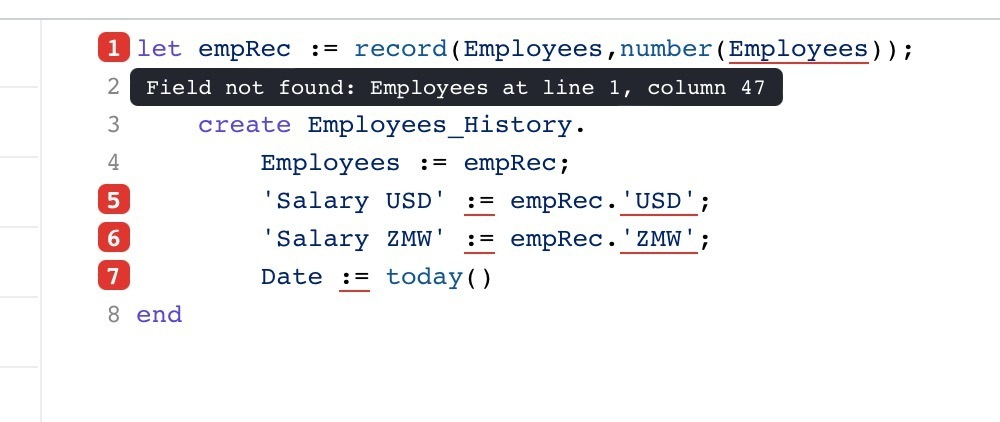
let empRec := record(Employees,number(Employees)); if empRec != null then create Employees_History. Employees := empRec; 'Salary USD' := empRec.'USD'; 'Salary ZMW' := empRec.'ZMW'; Date := today() end -
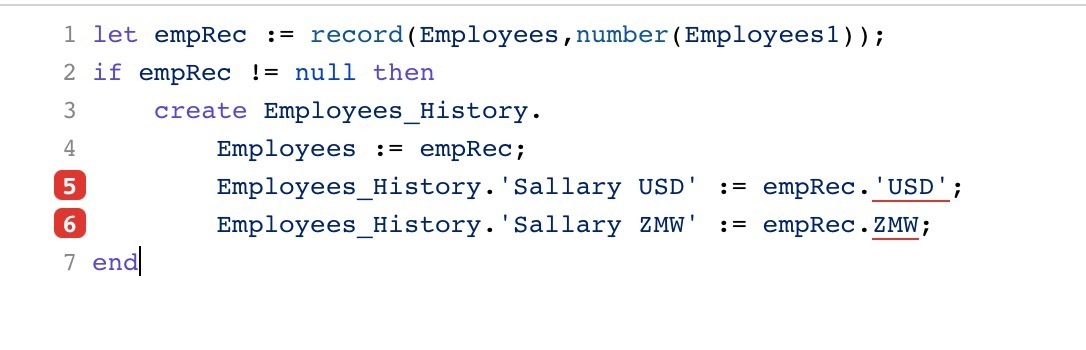
The field is called Employees1 so your first line needs to be
let empRec := record(Employees,number(Employees1));Regards John
-
Hi
A couple of things here with lines 5 & 6.
1. You don't need to state the table name, this will bring up an error.
2. You don't have the fields 'USD' and 'ZMW' in the Employees table. From what I can see they are in the Expenses_Table table.
3. You don't have a Date field, there are 'Beg Date' and 'End Date'
4. If you use create Employees_History directly the fields being updated then need to be wrapped in brackets.
I have keyed this into your button without any errors, so I am hoping it will work for you
let thisRec :=this;
let empRec := record(Employees,number(Employees1));
if empRec != null then
    create Employees_History.(
        Employees := empRec;
        'Sallary USD' := thisRec.'USD';
        'Sallary ZMW' := thisRec.'ZMW';
        'Beg Date' := today());
end
Regards John

Content aside
- Status Answered
- 10 mths agoLast active
- 8Replies
- 79Views
-
3
Following