
Ninext : Native JavaScript
I start here a new post about the Native JavaScrip to differentiate it from the EvalJS function in which I had previously put it...
I discovered one weekago that it was possible to add comments in Ninox. In fact, this notation was originally intended to be able to add JavaScript code directly into the Ninox code. The structure of the function is there, but it was left as a skeleton.
I just added a NativeJS module in the Ninext project (see Ninext project) which gives the possibility to add JavaScript blocks in the Ninox script. As an example, this is what it looks like :
function copyToClipboard(value : text) do
    #{
    navigator.clipboard.writeText(value);
    alert( '"'+ value + '" copied on clipboard' );
    return value;
    }#
end;

copyToClipboard('User value')
Copy
Everything between #{...}# is in JavaScript, the rest is Ninox code.
I worked a little bit to make it possible to use directly Ninox variables and function parameters in the JavaScript. It is also possible to define the type of variable that return by the JavaScript code. This allows, for example, to manipulate variables of type NID (list of records) and to retrieve the value as if it had been created by a Select function.
This example takes a list of records sorted in an ascending way (the only one that is possible on Ninox) and reverses the sorting to make a descending list :
var asc := (select Customer order by 'First Name');
var desc := asc;
join(#{:nid(Customer) return desc.reverse()  }#.('First Name' + " " + 'Last Name'), " | ")
Copy
join(#{:nid(Customer) return desc.reverse() }#.('First Name' + " " + 'Last Name'), " | ")
It is this notation at the very beginning of the JavaScript block that defines the type of value returned. Here we ask that the result be a list of entries in the Customer table.
It is important to understand that Ninox is a precompiled code that determines in advance the nature of the returned variables, whereas JavaScript is interpreted in real time and we cannot predict in advance what type of value will be returned (unlike TypeScript). To switch from one world to the other, a minimum of definition is required.
By default, the type returned by a JavaScript block is Text.
It is also important to remember that this code only works if the Ninext project is initialized. The Ninext project is only initialized locally on the Mac application, iPhone IPad or on the local web browser. It is not initialized on the Ninox server. So if you use JavaScript blocks, you have to make sure that they will never be executed on the server, for example by API calls that would read the value of a formula (only the eval/exec function of the API can read the value of a formula).
If ever a block is executed on the server (or locally when Ninext is not initialized), the block is considered as a comment, as if it was not there.
I've attached an example database that I hope will help you get started with JavaScript block integration.

...
Since last week when I posted this text, I've made some changes in NativeJS :
- It is now possible to call a Ninox function directly from NativeJS,
- Added variable from For loop for i in select Customer do #{ var a = i['First Name']}#...
- It is now possible to have direct access to field values from a variable of Node type (var t := this #{t.Code = ... t['User value'] = ... }#...
- I added examples in the database
- CodeMirror is now the interface to enter the code to with syntax highlighting (but not auto-completion for the moment)
Have fun 😄
13 replies
-
I just put a small patch online: version 1.0.3.
I found a bug that occurred when NativeJS code called a global function. It concerned the management of variable scopes which was not respected. NativeJS tried to access variables out of scope and this caused a bug that prevents the execution of the code. This is now fixed.
-
Jacques TUR Hi Jacques, I downloaded your sample database and copied the code from the Run Code button to Trigger after update in User Value. It didn't run when I changed the value in that field. Do you have any plans, or is it even possible, to make it work in triggers? Thanks
-
Hello everyone,
I improved NativeJS to fix one bug with the date type return value. Now it works fine and you can get any date type like this:
#{:date return Date.now()}#return a Ninox date value : 22/11/2022
var myDate := now()
"on "+ #{:date return myDate}# + " at " + #{:time return myDate}#
return a string with date + time : on 22/11/2022 at 21:09
NativeJS version 1.0.4 -
Jacques TUR said:
NinextHello Jacques TUR! I have already read your article regarding Java Script. It was very interesting to me but I am not a software developer therefore it was hard to understand.
With Ninox I created an invoice management and at the end of the process I create a file which is stored in the database. I can download the file manually and send them to bank via online banking.
is there a possibility with your Java Script to download the file directly automated in the FileSystem of the computer?
looking forward to hear from you shortly
Michaek
-
Thank you a lot Jaques TUR,
I put the first code into global function as you mentioned. Then I tried to modify my code to implement the download of the file, but both ways you mentioned return an error: function not defined downloadFile(file, string). Here is my code:
let myBNK := 'BNK-Lauf-ID';
let myZLDat := format(now(), "YYYY-MM-DD_HHmm";
let myChoise := dialog("Buchungs-ID", "Ist die Buchungs-ID: " + myBNK + " noch die aktuelle?", ["ja", "nein"]);
if myChoise = "nein" then
alert("Bitte zuerst die Banklauf-ID manuell aktualisieren!")
else
if 'Zahlaufträgedatei erstellt?' = 1 then
alert("Bitte noch nicht übertragene Dateien auswählen!")
else
let myZDatei := 'Zahlaufträgedatei erstellt?';
let myArray := (select Zahllauf where 'Z-Datei erstellt' = myZDatei and Gesperrt = 0);
let myRow1 := "Transferart;Ausgabeart;Eigenkontoname;Auftragsunterart;Eigenkonto-BLZ/BIC;Eigenkonto-Nummer;Fremdkonto-BLZ/BIC;Eigenkonto-Inhaber;Fremdkontoname;Fremdkonto-Nummer;Fremdkonto-Inhaber;Verwendungszweck;DM-Betrag;Angelegt;Geplant;Späteste Ausführung;Ausgeführt;Skonto bis;Gebucht;Wertstellung;Fremdkonto-Inhaber;Skonto DM;Mehrfachausführung;Anzahl Ausführungen;Modus;Zusatzdaten;Ausstellungsort;Schecknummer;Textschlüssel;Memotext;Gesperrt;TAN1;TAN2;Angelegt von;Zuletzt geändert von;zuletzt geändert am;Primanota;Kategorisierungen;Betrag EUR;Auftragswährung;Skonto EUR;Umsatztext;1. Ausführung;externe AuftragsID;letzte Ausführung;Ende-zu-Ende-Referenz" + "
";
let myRows := for i in myArray do
i.Transferart + ";" + i.Ausgabeart + ";" + i.Eigenkontoname + ";" + i.text(Auftragsunterart) + ";" + i.'Eigenkonto-BLZ/BIC' + ";" + i.'Eigenkonto-Nummer' + ";" + i.'Fremdkonto-BLZ/BIC' + ";" + i.'Eigenkonto-Inhaber' + ";" + i.Fremdkontoname + ";" + i.'Fremdkonto-Nummer' + ";" + i.'Fremdkonto-Inhaber' + ";" + i.Verwendungszweck + ";" + i.'DM-Betrag' + ";" + i.Angelegt + ";" + i.Geplant + ";" + i.'Späteste Ausführung' + ";" + i.'Ausgeführt' + ";" + i.'Skonto bis' + ";" + i.Gebucht + ";" + i.Wertstellung + ";" + i.'Fremdkonto-Inhaber' + ";" + i.'Skonto DM' + ";" + i.'Mehrfachausführung' + ";" + i.'Anzahl Ausführungen' + ";" + i.Modus + ";" + i.Zusatzdaten + ";" + i.Ausstellungsort + ";" + i.Schecknummer + ";" + i.'Textschlüssel' + ";" + i.Memotext + ";" + i.text(Gesperrt) + ";" + i.TAN1 + ";" + i.TAN2 + ";" + i.'Angelegt von' + ";" + i.'Zuletzt geändert von' + ";" + i.'Zuletzt geändert am' + ";" + i.PrimaNota + ";" + i.Kategorisierungen + ";" + i.'Betrag EUR' + ";" + i.'Auftragswährung' + ";" + i.'Skonto EUR' + ";" + i.Umsatztext + ";" + i.'1. Ausführung' + ";" + i.'externe AuftragsID' + ";" + i.'letzte Ausführung' + ";" + substr(i.'Ende-zu-Ende-Referenz', 0, 32) + "
"
end;
let myFileName := format(now(), "YYYY-MM-DD_HHmm") + " " + myBNK + " " + "Zahllauf" + ".csv";
let myCSV := createTextFile(this, myRow1 + myRows, myFileName);
var myFile := first(files(this));downloadFile(myCSV, "");
'Anzahl der Zahlungstransfers' := cnt(myArray);
'Letzter ZL am' := now();
Gesamtwert := sum(myArray.'Betrag EUR');
let newBLP := (create 'Bankenlauf-Protokoll');
newBLP.(Datum := today());
newBLP.(Anzahl := cnt(myArray));
newBLP.(Gesamtbetrag := sum(myArray.'Betrag EUR'));
newBLP.(ID := myBNK);
alert("Es wurden " + cnt(myArray) + " Datensätze mit einem Transfervomumen von " + sum(myArray.'Betrag EUR') + " EUR verarbeitet. Bitte die Zahlungsträgerdatei herunterladen und im Filesysem <Dokumente/Zahlungsträgertransfer> ablegen, damit MacGiro sie importieren kann.")
end;With the bold marked code I tied the download, I guess I didn't adapted your code in the right was. Do you have an idea to improve?
Happy new year
Michael
-
Please read this message about the Ninext shutdown : https://forum.ninox.com/t/m1h0b4d/ninext-important-information
-
Based on' post https://forum.ninox.com/t/x2yp1qy?r=y4yp1a1, I created a global function that merges two PDF files into one. Many thanks to Sotirios for his excellent post — this is a perfect use case for NativeJS!
I updated the #Ninext 2-3 application with a page that demonstrates how to use this function. The updated application is available for download here: https://docs.ninext.fr/ninext-app-38
First, a simple case to merge two PDF files:
Button code: Merge PDF 1 and PDF 2
"Merge PDF 1 and PDF 2 into a single dataUrl";
var mergedPDF := mergeTwoPDFs(text(shareFile('PDF 1')), text(shareFile('PDF 2')));

"Import the merged PDF into the 'PDF 1 + 2' field";
'PDF 1 + 2' := importFile(this, mergedPDF, "File name.pdf")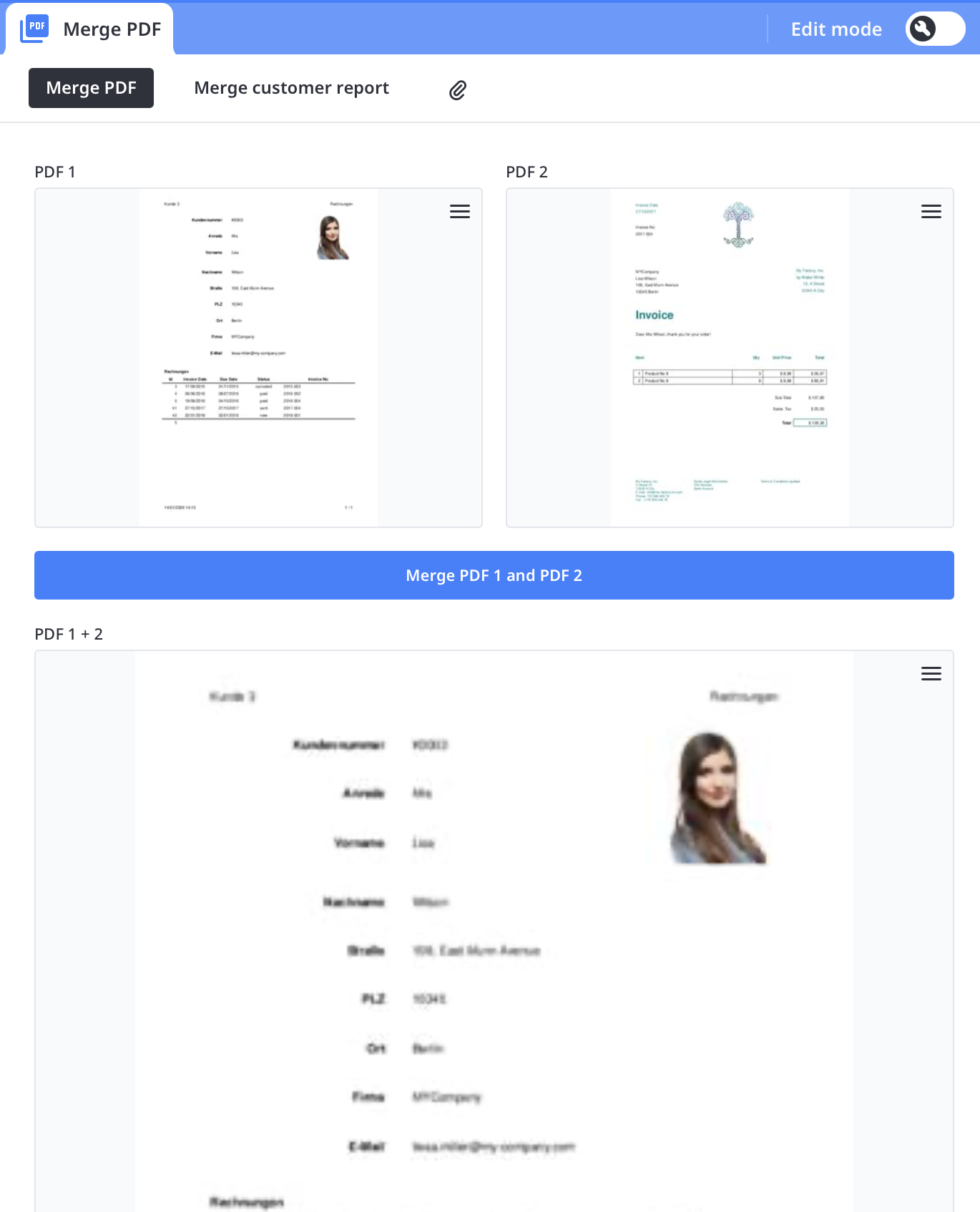
Then a more complex yet common use case. It prints a first page using a print layout (here the customer description), then appends all invoices for that customer:
Button code: Print report
"Remove existing files before generating new ones";
removeFile('Customer report file');
removeFile('invoice file');

"Build the output filename from customer's first and last name";
var FileName := ---
{ 'Selected customer'.'First Name' } { 'Selected customer'.'Last Name' }.pdf
    ---;

"Generate and import the customer report as the initial PDF";
alert("Printing customer report");
'Customer report file' := importFile(this, printAndSaveRecord('Selected customer', "Kunde"), FileName);

"Loop through all invoices of the selected customer";
for invoice in 'Selected customer'.Invoices do
    "Generate and import the current invoice PDF";
    alert("Printing invoice No " + invoice.'Invoice No');
    'invoice file' := importFile(this, printAndSaveRecord(invoice, "Invoice"));

    "Merge the customer report with the current invoice and update the report file";
    'Customer report file' := importFile(this, mergeTwoPDFs(text(shareFile('Customer report file')), text(shareFile('invoice file'))), FileName);

    "Clean up the temporary invoice file";
    removeFile('invoice file')
end;

"Notify user that the process is complete";
alert("Report completed")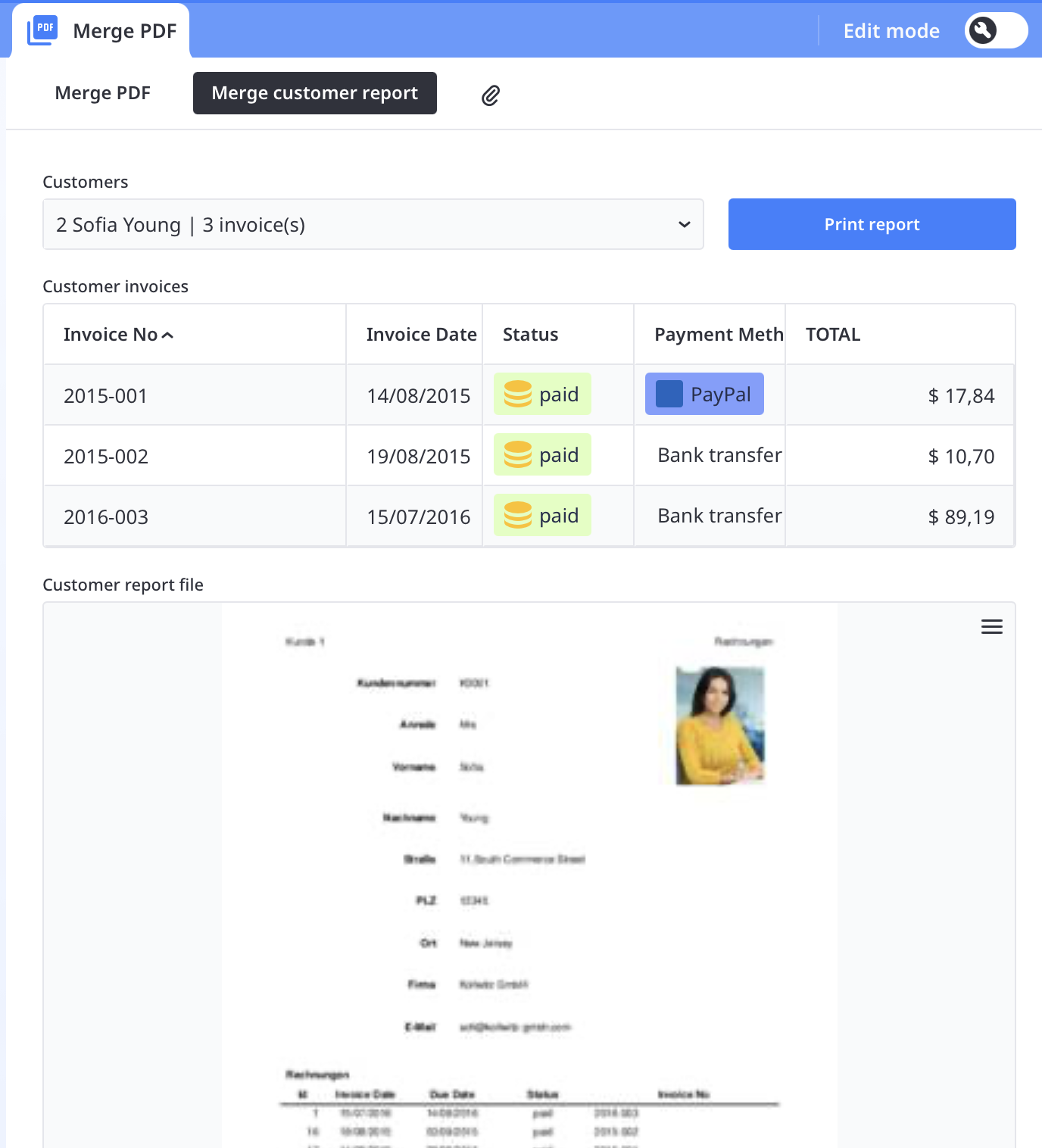
Finally, here is the global function itself:
Global function: mergeTwoPDFs
"----------------------------
mergeTwoPDFs - Merge two PDF files
Parameters:
  - url1 : URL or dataUrl of the first PDF (can be null or empty)
  - url2 : URL or dataUrl of the second PDF (can be null or empty)
Returns: dataUrl of the merged PDF (data:application/pdf;base64,...)
         or the valid URL if the other is null/empty
         or null if both are null/empty
-----------------------------";

function mergeTwoPDFs(url1 : text, url2 : text) do
    #{:text:callback
    (async () => {
        try {
            const DATA_URL_PREFIX = 'data:application/pdf;base64,';

            "--- Helper Functions ---";

            "Convert ArrayBuffer to base64 dataUrl";
            function bufferToDataUrl(buffer) {
                const uint8Array = new Uint8Array(buffer);
                let binary = '';
                for (let i = 0; i < uint8Array.length; i++) {
                    binary += String.fromCharCode(uint8Array[i]);
                }
                return DATA_URL_PREFIX + btoa(binary);
            }

            "Load PDF buffer from URL or dataUrl";
            async function loadPdfBuffer(url) {
                if (!url || !url.trim()) return null;

                if (url.startsWith(DATA_URL_PREFIX)) {
                    const binary = atob(url.replace(DATA_URL_PREFIX, ''));
                    const bytes = new Uint8Array(binary.length);
                    for (let i = 0; i < binary.length; i++) {
                        bytes[i] = binary.charCodeAt(i);
                    }
                    return bytes.buffer;
                }

                const res = await fetch(url);
                return res.ok ? await res.arrayBuffer() : null;
            }

            "Convert URL to dataUrl format";
            async function toDataUrl(url) {
                if (!url || !url.trim()) return null;
                if (url.startsWith(DATA_URL_PREFIX)) return url;

                const buffer = await loadPdfBuffer(url);
                return buffer ? bufferToDataUrl(buffer) : null;
            }

            "--- Main Logic ---";

            const hasUrl1 = url1 && url1.trim() !== '';
            const hasUrl2 = url2 && url2.trim() !== '';

            "Handle edge cases: none or single URL";
            if (!hasUrl1 && !hasUrl2) { callback(null); return; }
            if (!hasUrl1) { callback(await toDataUrl(url2)); return; }
            if (!hasUrl2) { callback(await toDataUrl(url1)); return; }

            "Load pdf-lib dynamically if needed";
            if (typeof PDFLib === 'undefined') {
                await new Promise((resolve, reject) => {
                    const script = document.createElement('script');
                    script.src = 'https://cdn.jsdelivr.net/npm/pdf-lib@1.17.1/dist/pdf-lib.min.js';
                    script.onload = resolve;
                    script.onerror = () => reject(new Error('Unable to load pdf-lib'));
                    document.head.appendChild(script);
                });
            }

            "Create merged PDF document";
            const pdfDoc = await PDFLib.PDFDocument.create();

            "Load and merge both PDFs";
            for (const url of [url1, url2]) {
                const buffer = await loadPdfBuffer(url);
                if (buffer) {
                    const pdf = await PDFLib.PDFDocument.load(buffer);
                    const pages = await pdfDoc.copyPages(pdf, pdf.getPageIndices());
                    pages.forEach(p => pdfDoc.addPage(p));
                }
            }

            "Return merged PDF as dataUrl";
            callback(bufferToDataUrl(await pdfDoc.save()));

        } catch (error) {
            callback(null, error.message);
        }
    })();
    }#
end;
Content aside
-
4
Likes
- 7 mths agoLast active
- 13Replies
- 1973Views
-
8
Following