
Workspace data encryption on Mac native app
Advanced data protection on the Mac
When the password protection feature has been activated for a database, its data is saved on the Mac in an encrypted format. This is the case both for locally saved databases in the "Local databases" section as well as any database which has been downloaded via synchronization with a workspace in the Public Cloud or Private Cloud for offline work. This way the password protection not only prevents users from entering the edit mode without knowing the database password but also inhibits any tampering with the data if it is accessed outside of the Ninox native app, e. g. via the Finder.
Workspace encryption
Starting with native app version 3.19.17, it is possible to encrypt entire workspaces on the Mac app. To do so, open the workspace you'd like to encrypt in the Mac app and access the workspace settings by clicking on the workspace selector dropdown top left, then choose the appropriate option.
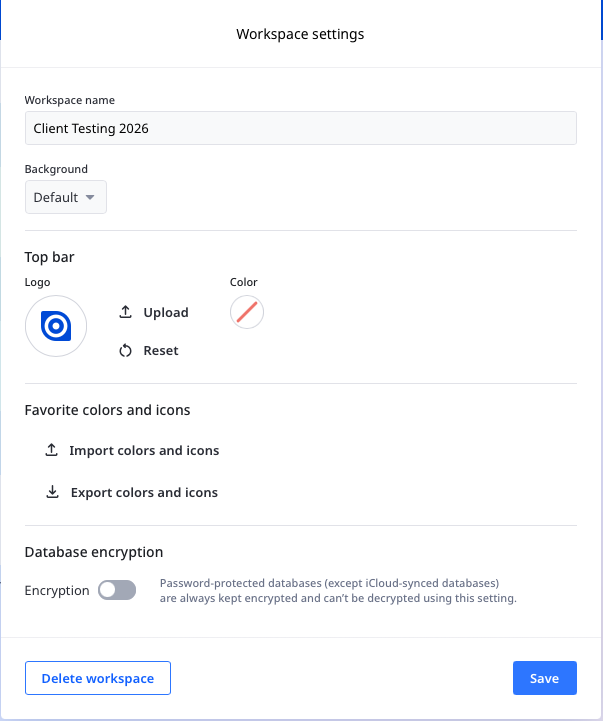
The settings popup now features a toggle Encryption at the bottom which will activate encryption for the workspace. This does not cause all databases in the workspace to be password-protected, but instead the data of all database is saved on the device in the same format as if they were password-protected.
💡 If an archive or manual backup is created and downloaded, the data within will not be encrypted anymore, unless the database already had an active password protection.
Device specific activation
This setting is individual to each Mac device (iPad and iPhone do not have this feature). If the workspace is not the "Local databases", but one in the Public Cloud or Private Cloud the activation will only affect the device from which it was toggled. Every member of the workspace may choose for themselves whether to activate the setting for their device or not.
Exception: iCloud-based databases
If this setting has been activated in the "Local databases", only databases that are saved on the device are affected. Those saved in the iCloud to be shared between devices associated with the same Apple ID remain unencrypted due to technical limitations in the communication between the Mac and iPad or iPhone.