
Ninext: bugs & fixes
I am opening this discussion so that everyone can post here the issues they encounter with the Ninext plugin version starting from version 3.x.
If you are using Ninext version 2.x, please post your message here instead: https://forum.ninox.com/t/p8h78zv/ninext-project
32 replies
-
“For the proper functioning and stability of your databases“
-
🎉 Ninext 3.1.2 is now available as a stable release!
Hello everyone,
Ninext 3.1.2 is now published as a stable release. It closes the 3.1 cycle and brings together, in a single official version, all the new features and improvements accumulated since 3.0.5: an interactive console, a completely redesigned dependency tree, information badges on field hover, multilingual help, plus a long series of fixes and performance gains.
⚙️ Installation: simply click the plugin's Update button.
✨ The major new features since 3.0.5
An interactive console to run Ninox code
A new "Console" tab lets you write Ninox code and run it on the fly, like an interpreter. The execution context is configurable:
- Live ⚡ — automatically uses the record currently open in Ninox (follows you as you switch records)
- Record — you pick the record yourself
- Formula — the context is defined by a formula you write
- None
The editor offers syntax highlighting, auto-completion, input help, error markers, a history of the last 50 commands (Alt + ↑/↓), and results displayed as raw value, expandable tree, or record table (with direct opening of records). Each result also shows its full date and time, preserved after the database is reloaded.
A visual and interactive dependency tree
The dependency tree has been completely rebuilt. You can explore dependencies downstream (which formulas depend on a field) and upstream (which fields feed a formula), both as a hover preview on a field and as a full tab inside Fields & Fx:
- Cells sharing the same parents are grouped into clusters you can drag with the mouse
- Memorization of positions, hidden cells and pagination
- Colored level bands, chain highlighting on hover, and highlighting of each cell's direct parent in multi-level trees
- Fullscreen mode and image copy (PNG, SVG, or clipboard)
- Stable updates: the tree keeps the zoom and position, and re-centers the field when you switch
An information badge on field hover
In admin mode, a badge appears when hovering a field and gives 4 shortcuts, with no need to pre-select the field:
- Returned type of the field (or declared type)
- Full formula in a tooltip (highlighting + Copy button) — click to open the Ninox formula editor directly
- Key button to open the Ninox field editor window
- Dependency counter (color = criticality) — hover for the graphical preview, click to select the field in Fields & Fx
The Finder now explores reports and the "After Open" trigger
Search and the dependency tree now analyze the content of Ninox print reports (text templates with formulas in braces, formula-generated HTML blocks, revision columns, image fields with formula, Carbone data sources) as well as the database's "After Open" trigger, which appears as a dedicated entry at the top of Fields & Fx, next to global functions.
Note about Carbone: only the data source formula is analyzed; the names of fields inserted in the Word file are not yet accessible to Ninext.
Support for external databases
When your database uses fields or tables from other databases of the same team, they now appear in the Fields & Fx list and in the dependency graph, marked with a dedicated icon.
Ninext function documentation in 10 languages
The help for Ninext-specific functions is available in 10 languages (French, English, German, Italian, Spanish, Catalan, Polish, Russian, Simplified and Traditional Chinese) and automatically follows your Ninox language, with no plugin reload.
A reliable startup entry point:
onNinextLoadedWhen Ninox starts, the After Open trigger runs before Ninext (and therefore NativeJS) is operational, so any dependent JavaScript silently fails. If you define an
onNinextLoaded(event)function in the After Open trigger, Ninext calls it automatically once it is truly loaded and operational, passing the current version viaevent.version. You finally have a reliable entry point to run NativeJS code at startup or adapt your database's behavior to the detected Ninext version.function onNinextLoaded(event : any) do alert("Ninext " + event.version + " is ready"); " … your JavaScript / NativeJS code here"; end;Field navigation history
An icon in the Ninext panel header opens the list of most recently used fields (MRU logic, a single button):
- Each field you visit moves to the bottom of the list, with no duplicates
- Clicking an entry selects the field without reordering the list and highlights it
- Up to 50 entries kept throughout the day (fields, global functions, reports, After Open trigger)
Code Finder: search history and saved preferences
- Last 20 searches in a dropdown
- Per-database memorization of search preferences (regex, case sensitivity, whole words, filters)
- Result pagination in batches of 100
🛠️ Reliability & performance
Throughout the 3.1 cycle, many fixes and optimizations have made the tool more reliable:
- 100% CPU / slowdowns fixed — a dependency-tree process kept running in the background once the panel was hidden, sometimes maxing out the CPU with no interaction at all. Fixed.
- Opening the selectors (tables, fields, expressions) ~10× faster — on large databases, the first display could freeze the interface for one to two seconds.
- Reliable "Errors" tab — no more "ghost" errors at startup (NativeJS formulas
#{ … }#wrongly flagged), error count always in sync with the list, cleaner layout. - Custom buttons (
onUpdate) — caption, color and badge now apply correctly even when your function does asynchronous work. - View click (
onclick) — an asynchronousonclickno longer triggers the selection twice; the decision is fully driven by your code. - No more duplicate dependencies — each dependency now appears only once in a field's list.
- Field deletion while typing — in admin mode, pressing Delete / Backspace while typing text no longer opens the delete-field confirmation dialog.
- Help page — no more horizontal overflow or stray separator lines; code blocks and examples render cleanly.
💬 Your feedback
Please report any unexpected behavior or suggestion:
- Directly in this forum thread
- info@umangenius.com
Many thanks to everyone who keeps this project alive. Take care!
💛 Support Ninext
Ninext is an independent project that saves you time every day in Ninox. It's backed by no vendor: its regular updates rely solely on the support of its users.
If Ninext is useful to your work, you can help keep it going — every contribution directly funds maintenance and new features.
A few professionals already support Ninext — be among the first to join them.
👉 Support the development of Ninext
Thank you to everyone who makes this project possible!
-
Hi ,
Thanks for Ninext — it's a core part of my Ninox workflow.
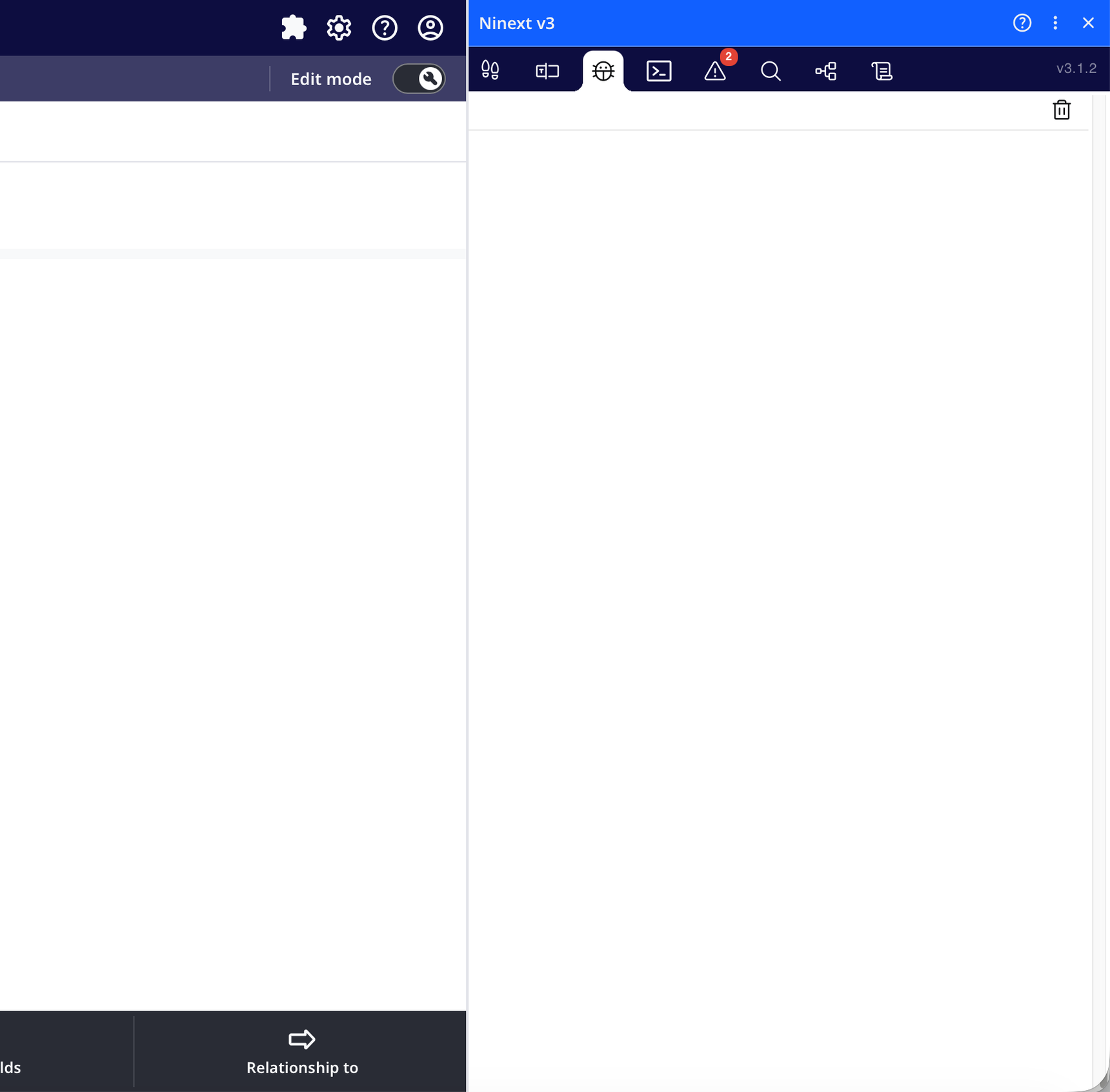
One minor, purely cosmetic note: the Ninext panel's blue title bar and toolbar don't match the colour theme of the Ninox app next to it (mine is dark navy/indigo), so the panel stands out a bit (screenshot attached).
Nothing urgent — it would just be a nice touch if Ninext could pick up the active app theme's colours, or offer a setting to customise the header/toolbar colour.
Thanks again!
Sotirios
Content aside
-
3
Likes
- yesterdayLast active
- 32Replies
- 508Views
-
9
Following