0

Trouble finding a column
Hello Ninox team!

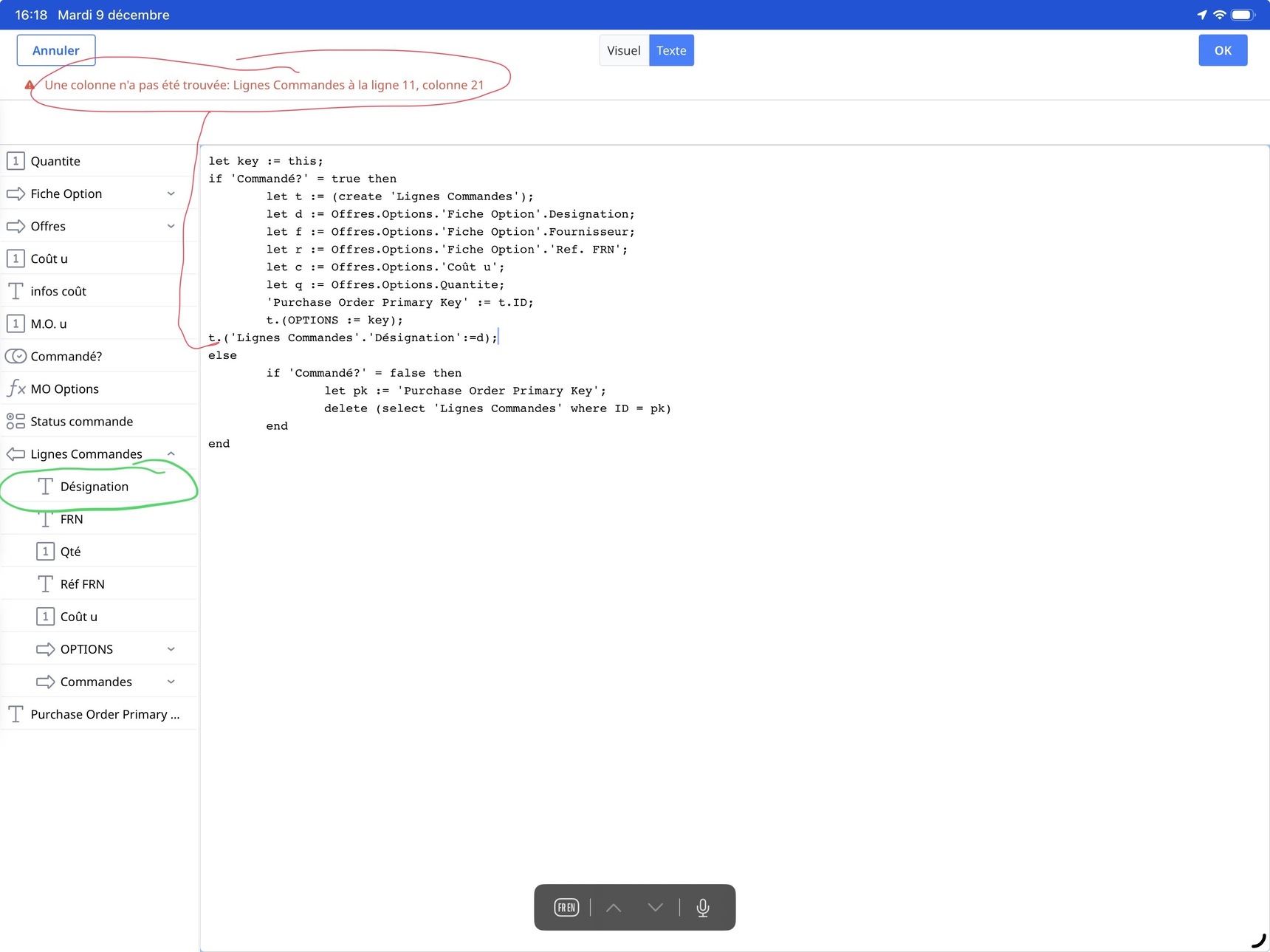
I’m using the script attached, but Ninox tell me he can’t find a column. Ok Ninox but the column appears well in the side bar and in the table…

Could you please guess why?

18 replies

null
    • Ninox partner
    • RoSoft_Steven.1
    • 12 days ago
    • Reported - view

    Remove the 'Lignes Commandes' in your 11th row:

    t.('Désignation' := d)

    • John_Halls
    • 12 days ago
    • Reported - view

    Just looking at your code you can clean it up with some simple changes

    1. 'Commande?' = true and  'Commande?' are the same thing

    2. You don't then need a second if to test for false.

    2. t.ID and t are the same thing


    let key := this;
    if 'Commande?' then
       let t := (create 'Lignes Commandes');
       let d := Offres.Options.'Fiche Option'.Designation;
       'Purchase Order Primary Key' := t
       t.(OPTIONS := key;
          'Lignes Commandes'.'Designation' := d)
    else
       let pk := 'Purchase Order Primary Key';
       delete (select 'Lignes Commandes' where ID = pk)
    end
    

    In your select, are you sure you want ID = pk? It looks like you are testing for a primary key in one table equalling a primary key in another.

    Regards John

    • John_Halls
    • 12 days ago
    • Reported - view

    Sorry, from your original issue, it should be

    let key := this;
    if 'Commande?' then
       let t := (create 'Lignes Commandes');
       let d := Offres.Options.'Fiche Option'.Designation;
       'Purchase Order Primary Key' := t
       t.(OPTIONS := key;
          'Designation' := d)
    else
       let pk := 'Purchase Order Primary Key';
       delete (select 'Lignes Commandes' where ID = pk)
    end


    Regards John

    • Fred
    • 12 days ago
    • Reported - view

    The reason why you need to remove 'Lignes Commandes' is because you are already in the Lignes Commandes table. You use the variable t. Which is a reference to the create() command a few lines above, which you point to the Lignes Commandes table.

    • frsalabert.1
    • 11 days ago
    • Reported - view

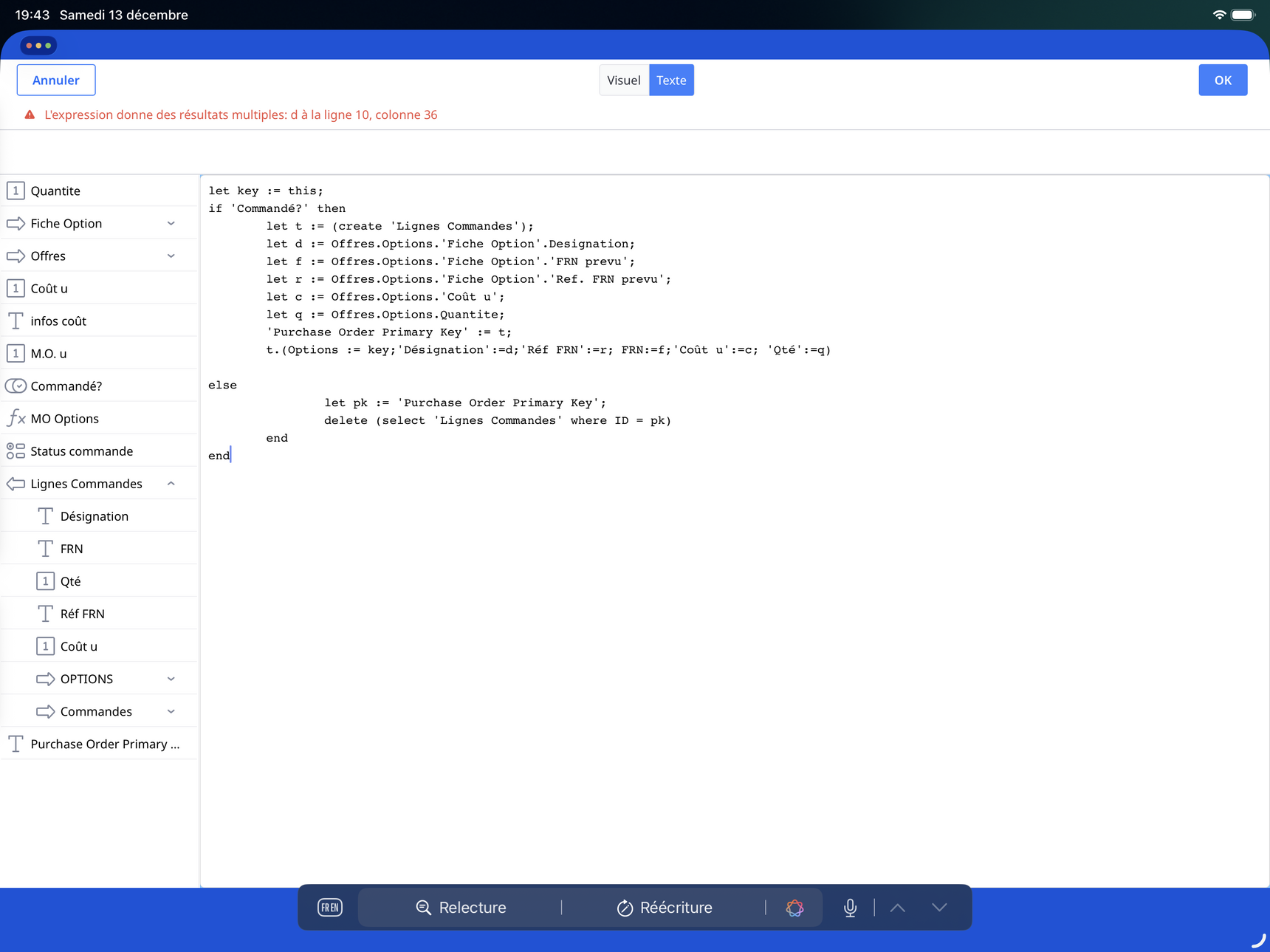
    Thanks everybody for your replies. I understand my semantical fault, but when I fix it Ninox tell me: expression return multiple results line 10…

      • Fred
      • 11 days ago
      • Reported - view

       it looks like Offres is the many side of the relationship, so Ninox will always assume that multiple records will be returned. Even if you only have 1 record linked, Ninox will return an array.

      If you only have 1 record linked in all the related tables, you need to use the first() or last() command to tell Ninox to only grab 1 record.

    • John_Halls
    • 10 days ago
    • Reported - view

    There’s an extra end, line 14, that isn’t needed. 

    • frsalabert.1
    • 7 days ago
    • Reported - view

    Hello everybody and thanks for your concern. I understand now the trouble and I think I’m not proceeding the right way with this formula.

    What I wanted to do is to select (with a selection button) a record or many and copy it or them in the ‘table ligne commande’ with all its columns so I can gather many ‘ligne commande’ in one order…

    • Fred
    • 6 days ago
    • Reported - view
      • frsalabert.1
      • 2 days ago
      • Reported - view

       Hello Fred! Thanks for your consideration. The screen shot displays what I’ve got in the table ‘options’. this table only manage prices and quantity, it’s link to one record in table ‘Fiche option’ (describing the option, seller,etc). Table ‘options’ is also link to one record in table ‘Offres’. So I have one offer for One vessel with many options (price/qty/and the details of this options like name/seller….).

      I would like to select those options with a selection button: when selected, the option (with all infos and its link to ‘Fiche option’) should be duplicated in ‘lignes commandes’. In that way, i can choose the options I want and gather them in the ‘commandes’ table. Ideally when the option is de-selected , it should be remove from the ‘lignes commandes’ table.

      You’ve already made me a duplicate button for my vessel in another topic, but I was not able to use it for this new purpose…

      • Fred
      • 2 days ago
      • Reported - view

       Thanks for the update. I am unclear about:

      I would like to select those options with a selection button: when selected, the option (with all infos and its link to ‘Fiche option’) should be duplicated in ‘lignes commandes’.

      What options are you talking about? You are in the 'Options' table, so I'm guessing a record is one option?

      Can you upload a copy of your DB with some test data?

      • frsalabert.1
      • 2 days ago
      • Reported - view

       Correct. Attached the DB

      • Fred
      • 2 days ago
      • Reported - view

       can you put in some sample data?

      • frsalabert.1
      • 2 days ago
      • Reported - view

      sorry, it should have data… try this one…

    • Fred
    • 2 days ago
    • Reported - view

    Ok, let me see if I understand what you want.

    I would like to select those options with a selection button:

    What table are you thinking this new dynamic multi choice field would be created in?
      • frsalabert.1
      • yesterday
      • Reported - view

       I think the best place for this selection field is in ‘options’ table . I already created it, the column name is ‘commandé?’ And script is in trigger after change.

      • frsalabert.1
      • yesterday
      • Reported - view

       I also find this script which could be useful:

      Button to copy from Inventory to Delivery

      let x:= Commercial_Client;

      let y:= Commercial.'Référant';

      let z:= Commercail.'Intitulé/Bateau';

      let c := (create 'AFFAIRES');

      c.(Affaires.Client := x);

      c.(Affaires_Référant := y);

      c.(Affaires_Intitulé/Bateau := z)

      • Fred
      • yesterday
      • Reported - view

       Try this code instead:

      let key := this;
      if 'Commandé?' = true then
          (create 'Lignes Commandes').(
              OPTIONS := key;
              'Désignation' := key.'Fiche Option'.Designation;
              FRN := key.'Fiche Option'.'FRN prevu';
              'Réf FRN' := key.'Fiche Option'.'Ref. FRN prevu'
          )
      else
          delete (select 'Lignes Commandes' where OPTIONS = key)
      end
      

      I didn't understand why in your code:

      let d := Offres.Options.'Fiche Option'.Designation;
      let f := Offres.Options.'Fiche Option'.'FRN prevu';
      let r := Offres.Options.'Fiche Option'.'Ref. FRN prevu';
      

      You go out to the Offres link then back into Options. Looking at your records in Offres there are 50+ Options records linked to 1 Offres record. So Ninox is creating an array of data.

      Then you have:

      t.('Désignation' := item(this, 0));
      t.(FRN := item(this, 1));
      t.('Réf FRN' := item(this, 2))
      

      I'm guessing you are trying to get the current record data.

      In Ninox, you don't need to repeat the the if code in the else:

      else
          if 'Commandé?' = false then
      

      Technically, you don't need to put

      if 'Commandé?' = true then
      
      also works:
      
      if 'Commandé?' then

      but I left it in because for some it makes the code clearer.

      Then you delete() code would have deleted the wrong record:

      delete (select 'Lignes Commandes' where Id = pk)
      

      because the record ID of Lignes Commandes is not the same as the record ID of Options.

Content aside

  • yesterdayLast active
  • 18Replies
  • 97Views
  • 4 Following