
0

Date formula

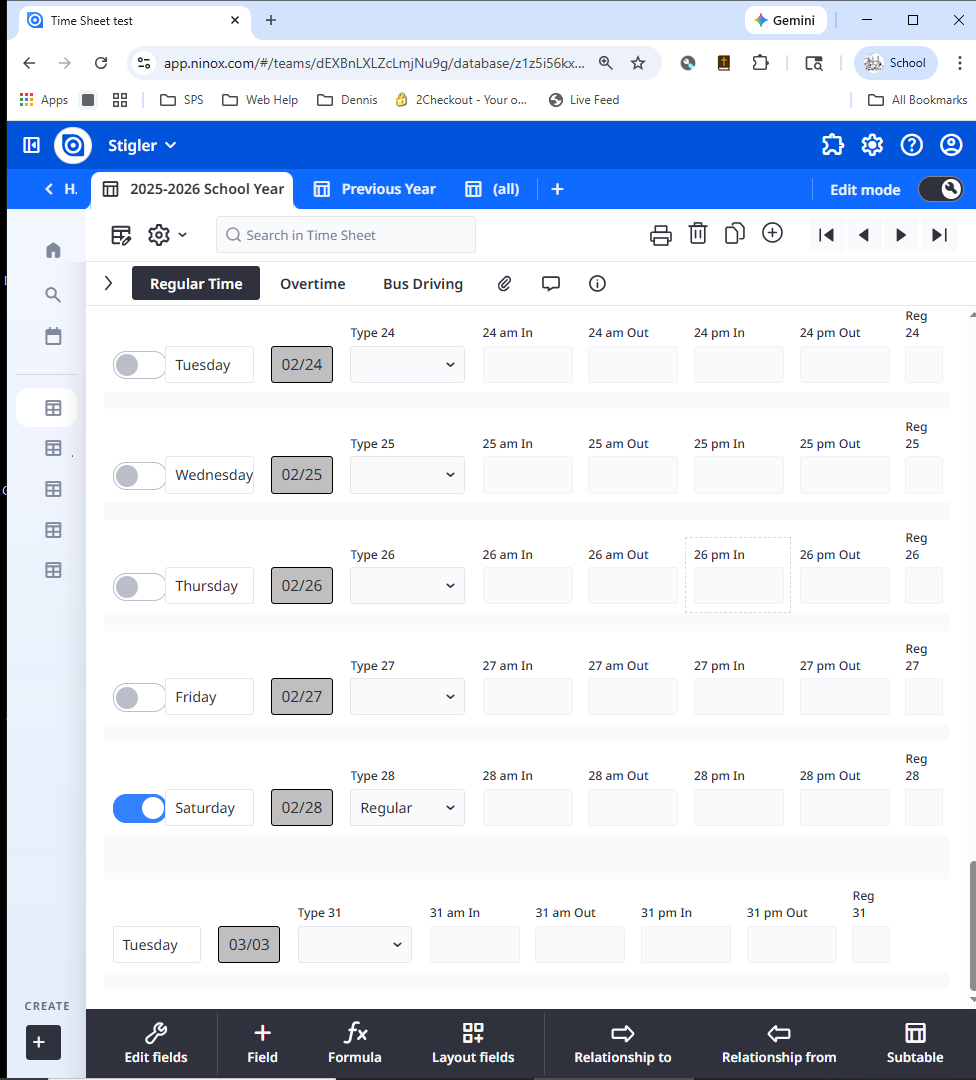
I have my employer's time sheet built into Ninox and it works great except for February.  I want to be able to hide the days that the month does not have (Day 31 normally).  And this works except for February.  I can hide Day 29 and Day 30 , but Day 31 shows up.  I have a start day and end day, and have 3 conditions to hide the field, and it functions correctly except in February.  Attaching pics.  Type 31 is a choice field that has Regular day, sick day, vacation, etc.  Override is if it is a weekend and we have been out for what ever reason I need it to show up because I hide weekends as well.

24 replies

null
    • Fred
    • 2 days ago
    • Reported - view

    So what field do you use to hide Day 29 and 30? Maybe lead with that field, then filter on days of the week.

    Also, as an FYI, when you find your self creating fields that have a number at the end because you need want to store many iterations of the same data (i.e. Type 1 - 31 or Day 1 - 31), then you probably should create a child table that stores the data.

    With a child table, that only has Day and Type instead of Day 1 and Type 1, you can quickly filter your table without complicated formulas that have to look at Day 1 - 31 or Type 1 - 31 or any other of the fields that has 31 iterations.

      • wright_74472
      • 2 days ago
      • Reported - view

       I have a pic of the formula I use - adjusting for the different date.  This formula works in November, but not in February.

      • Fred
      • 2 days ago
      • Reported - view

       I see the code, but which specific field do you use to mark days that are not part of the month?

      • wright_74472
      • 2 days ago
      • Reported - view

       Start Date

      • Fred
      • 2 days ago
      • Reported - view

       Can you explain how you use start date to limit the Display field only if?

      • wright_74472
      • 2 days ago
      • Reported - view

       it shouldn't show if the month of the start date does not equal the month of the start date + 30 days

    • John_Halls
    • 2 days ago
    • Reported - view

    Hi

    I agree with Fred. Having 31 copies of the same fields is going to be so hard to maintain. Create a child table with a single copy of the same set of fields and then create the records you need in a script. Everything becomes so much easier once you have done this. You can then create dashboards, summaries, reports etc very easily. 

    For example, if you wanted to add up hours for the month, you would currently need to have a formula

    Hours01 + Hours02 + Hours03 + ... + Hours30 + Hours31

    With a child table this would become

    sum(childTable.Hours)

    If you need some help to do this Fred or I are on-hand.

    Regards John

      • wright_74472
      • 2 days ago
      • Reported - view

       Question - why does the formula work for day 31 in November - it hides it.  But not in February (it doesn't)?

      • John_Halls
      • 2 days ago
      • Reported - view

       It's to do with the first line of your formula

      format('Start Date' + 30 "MM") = format('Start Date' "MM")

      For February, and only February, this is not true.

      Regards John

      • John_Halls
      • 2 days ago
      • Reported - view

       In fact, I don't think I am quite right there but I feel I must be along the right lines...

      I know you must have put in a lot of work to get this working but I would encourage you to think about moving over to using child records.

      • wright_74472
      • 2 days ago
      • Reported - view

       every month I create a new record and have a start date and end date.  this formula adjusted for days (ex day 29, day 30, day 31), works in every other month but February.  And it works on day 29 and day 30 (Formulas adjusted for day of month).  WHy will this not work on day 31 when start date month is February?

      • wright_74472
      • 2 days ago
      • Reported - view

       how can I call records for a specific day of the month.  If I use a table on the time sheet it does not fit right into available space.  If I can call specific date and time into a field then would be glad to.  Haven't figured that one out yet.

      • Fred
      • 2 days ago
      • Reported - view

       There are many date functions you can use. One is day(). There are many others. Things will look different and you may want to use pages/dashboards to display information. The transformation to a new data model is a big deal. 

      • wright_74472
      • 2 days ago
      • Reported - view

      how would I call the info for say February 27, 2026 Time in 0723, lunch out 1130, lunch back 1230 clock out 1630 and then 8 hour total


      • Fred
      • 2 days ago
      • Reported - view

       if there is a field called Date then something like:

      select Timesheets where Date = date(2026,02,27)

      Where Timesheets is the name of the table that stores individual days. Change the name to match your child table.

      FYI, Ninox uses milliseconds from Unix epoch (Jan 1, 1970) to keep track of date fields. So you need to use the date() command to type in a date in human terms to convert it into a date that Ninox can read.

      I'm assuming you only have 1 record per day per person, so once you find that the record that matches, you can get anything else from the record that you need.

      Ninox has a timesheet template. Create a new DB based on that template and take a look at how they do things.

      • wright_74472
      • 2 days ago
      • Reported - view

      how would I call in the time field for that date?  Time in, lunch out, lunch back, clock out?  and would I have to reprogram each month (when Feb 27 changes to Mar 27

      • Fred
      • 2 days ago
      • Reported - view

       Forgot to mention that if you are accessing data in a child table then you don't need a select statement. You can just reference the child table in code:

      childTableReferenceFieldName[Date = date(2026,02,27)]

      Once you have a record in a variable, then you can reference any field by using 'dot' notation.

      So if you have a formula field like above, first we put it in a variable then we use the first() command to tell Ninox to only get 1 record:

      let febRec := first(childTableReferenceFieldName[Date = date(2026,02,27)])

      This is because Ninox will return an array even if there is only 1 record returned.

      Then we can reference Time In or such fields by:

      let febRec := first(childTableReferenceFieldName[Date = date(2026,02,27)]);
      febRec.'Time in'
      • wright_74472
      • 2 days ago
      • Reported - view

       how would i do this month to month without having to edit formulas every month?  I know this is probably simple, just not getting my head wrapped around it.

      • wright_74472
      • 2 days ago
      • Reported - view

       also i tried downloading the time tracking template.  It just goes to my ninox page and does nothing.

      • Fred
      • yesterday
      • Reported - view

       Well, it is and it isn't. First let me know what is your background with databases or coding? 

      Now tell me what you want these month to month formulas? Or better what kind of "reports" do you want to see from your database?

      • wright_74472
      • yesterday
      • Reported - view

       I have used Ninox for several years - 2019 start.  developed several databases as time allowed.  had electrical maps, HVAC info, bus info and inspection.  Lots of varied material. Thought I had a decent handle on formulas till this hiccup.  Most complicated was a cutting order program for a custom processing plant in my town.  

      Monthly timesheet is the main item now.  I figured out how to rotate the name, month, year,  job title, and placed them on time sheet.  Month name and year cycles with start date of record.   

    • Fred
    • yesterday
    • Reported - view
     said:
     also i tried downloading the time tracking template.  It just goes to my ninox page and does nothing

    It sounds like you have the cloud version of Ninox. You don't see the Time Tracking DB in your workspace? That is what happened to me when I clicked on button.

      • wright_74472
      • yesterday
      • Reported - view

      no it is not.  Checked that spot first then found it on web.

    • John_Halls
    • yesterday
    • Reported - view

     I started re-creating your formula and this works

    format('Start Date' + 30, "MM") = format('Start Date', "MM")
    

    But this doesn't

    format('Start Date' + 30, "MM") = format('Start Date', "MM") and
        'Formula 31a' = "Monday" or
    'Formula 31a' = "Tuesday"
    

    I am almost certain that it's to do with the fact that you are mixing and's and or's and it will display if the day is a Tuesday.

    Regards John

Content aside

  • yesterdayLast active
  • 24Replies
  • 77Views
  • 3 Following